
signals10 min read
Auto Evaluation for Real2Sim2Real
Building a local robot-evaluation workshop on NVIDIA DGX Spark™.
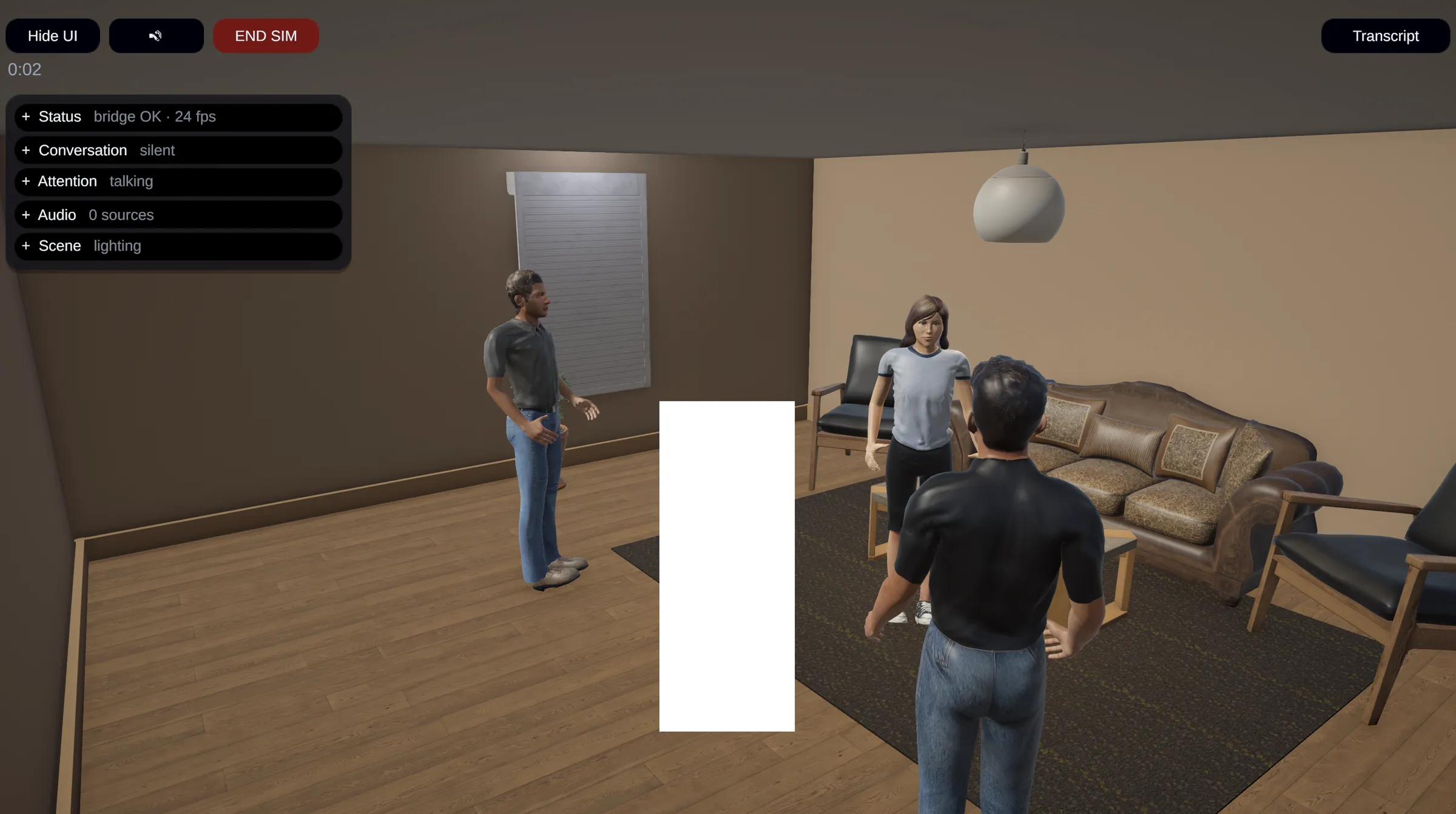
Ten minutes of robot footage can eat an entire afternoon if you let it. At Robot Health, a careful review usually takes a human labeler 60–90 minutes per ten-minute recording. Someone glances away, another person interrupts, the robot hears a noise as a word - and I’m scrubbing backward again.
Our simulator is useful, but real life supplies an unreasonable amount of nuance. Even someone deliberately facing the camera keeps moving their eyes, mouth, and head. Those little movements matter when you’re debugging perception and social interaction.
Robot logs tell us what the system believed. Evaluation means checking that belief against the recording: the real multimodal reality, what the robot missed, and whether its reaction made sense. Some bundles come from scripted tests; others come from our alpha users, with less context and more detective work.
The payoff of real data with comprehensive labels from test or deployed units, however, is excellent. Two or three carefully annotated sessions can give our coding agent almost a day’s worth of useful iteration. The bottleneck is getting those annotations.
Enter the NVIDIA DGX Spark
Through Robot Health’s participation in NVIDIA Inception, our partners at NVIDIA provided us with an NVIDIA DGX Spark. Thank you! That sparked (no pun intended) an experiment I had wanted to try for a while: an all-in-one local assistant for evaluating our recordings.
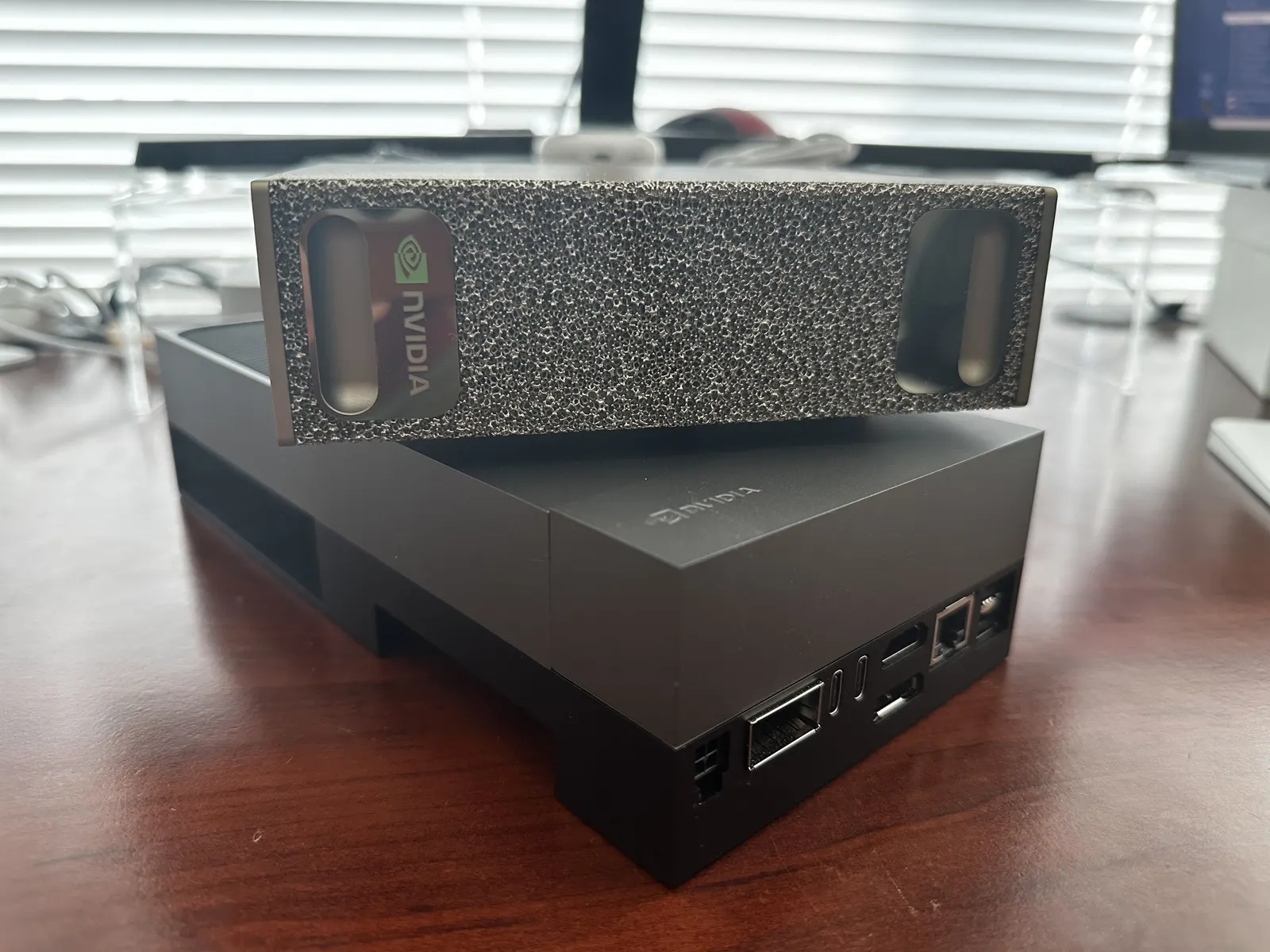
We call it Sima, after the Chinese historian Sima Qian. Its job is to assemble the evidence, draft the analysis, and give me something concrete to check. The interesting part is how many times it needs to look.
One Recording, Many Looks
In my early experiments, asking a model to analyze a long video in one shot quickly lost the details I cared about. Beyond roughly 30–60 seconds, useful nuance started disappearing into a pleasant summary.
Our workflow takes a more curious approach:
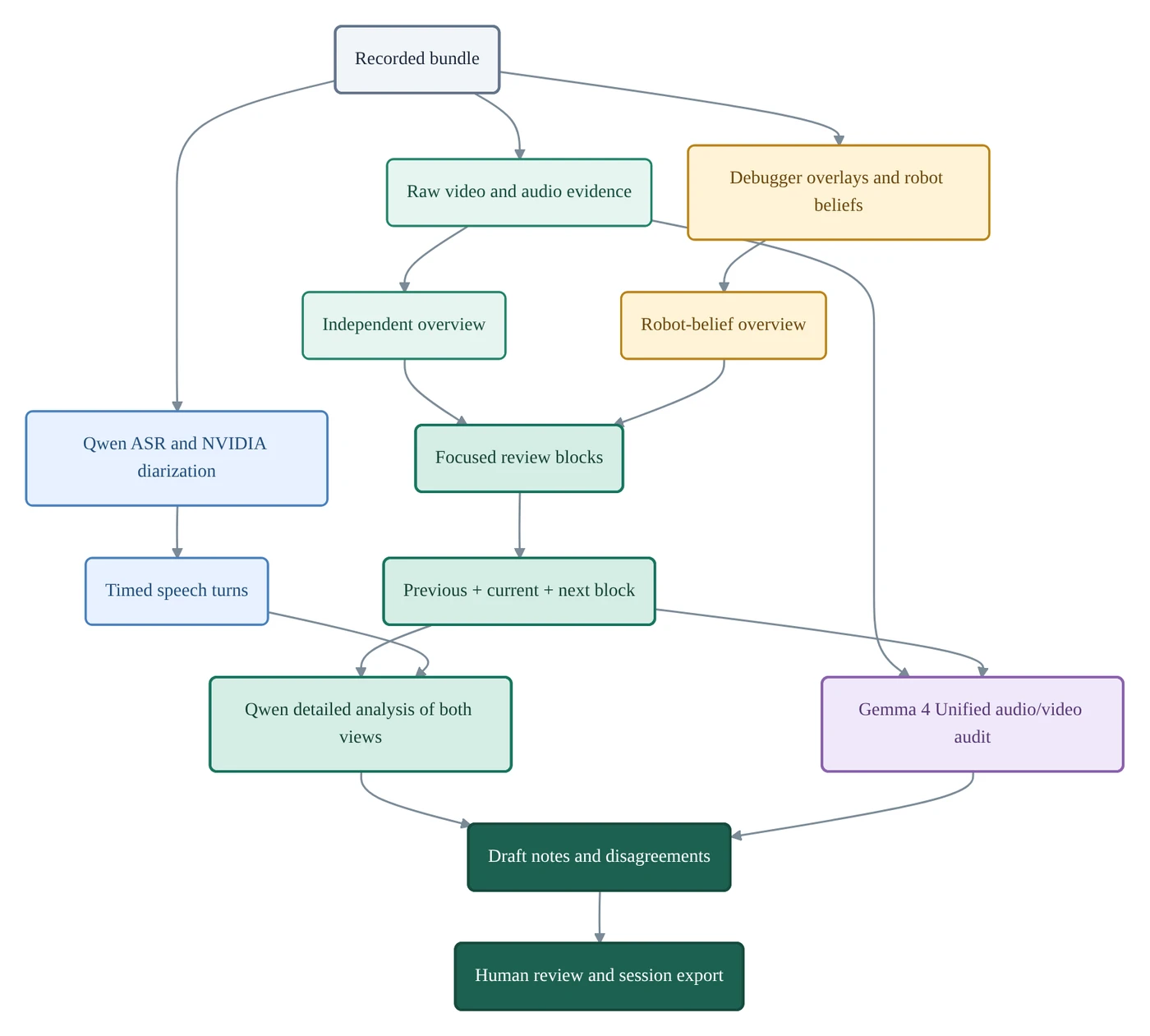
- Watch what happened. Sweep the whole session in manageable clips, using raw video and audio evidence. Establish an independent account before introducing the robot’s predictions.
- Watch what the robot believed. Make a separate sweep with the perception-debugger view: boxes, identities, and beliefs overlaid on the scene. Seeing a box jump between people can be much clearer than reading a sequence of log entries.
- Find focused blocks. Group related events into reviewable sections, often around one to three minutes, with shorter blocks wherever useful. Within each block, the models work through manageable clips.
- Zoom in, with neighbors. Revisit each block with the preceding and following blocks as context. An interruption makes more sense if you know what it interrupted; a head turn makes more sense if you see what happened next. Repeat this for both raw and debugger views, preserving the distinction between observation and robot belief.
- Ask for a second opinion. Gemma 4 audits the audio/video evidence and Qwen’s draft conclusions, flagging missed details and disagreements for review.
- Bring in the human. Review the notes against the source, correct mistakes, and export the session. Identity matching also gets a human check during intake.
Here’s the multiplication hiding inside that process: two overview sweeps + three-block context × two views ≈ eight full-video equivalents. And that’s before the second opinion, retries, and the next round of experiments.
Picking the Crew
Qwen3.6-35B-A3B is our main video analyzer. It gives us native video input at a useful speed. We also tried Qwen3.8-27B; on our tasks, the quality difference was small while generation was noticeably slower in our setup. That made Qwen3.6 the practical choice.
We use Gemma 4 12B as our parallel auditor, checking the audio/video evidence and Qwen’s analysis to produce a second opinion. Qwen3-Omni gave comparable results in my tests, but I liked having a different model family on the review team. Gemma flags missed details and questionable conclusions before I sit down for the final review. We also considered Qwen3.8-Omni-Flash, which looks promising for this audio/video workload, but its open weights aren’t available yet (as of this writing), so it isn’t an option for running the pipeline locally on NVIDIA DGX Spark.
For speech, Qwen3-ASR-1.7B handles transcription and NVIDIA Nemotron™ 3 Diarization, available through NVIDIA NeMo tooling, handles who spoke when. Alignment combines those into timed speech turns. In a room with several people, getting the words right but assigning them to the wrong person can derail the entire analysis. NVIDIA’s work on these specialist models deserves a thank-you too.
The supporting cast matters too. We use ReDimNet2 for voice embeddings and MediaPipe for face detection and extraction. These helpers turn audio and video into voice references and face crops that feed the identity-matching workflow, helping Sima connect the people we hear with the people we see.
Why DGX Spark Makes This Enjoyable
There’s room for the whole toolbox. DGX Spark’s 128 GB of unified memory is especially useful when the workload includes a primary model, a reviewer, speech models, and their caches.
| Component | Rough memory footprint |
|---|---|
| Qwen3.6-35B-A3B | 48 GiB allocated, plus runtime caches and working memory |
| Qwen ASR | 4.7 GiB allocated |
| Nemotron 3 Diarization | 0.7 GiB allocated |
| Gemma 4 12B | 24 GiB allocated, plus runtime caches and working memory |
Two large models, one box. We keep Qwen3.6 and Gemma 4 12B loaded together on DGX Spark, with ASR and diarization alongside them. Qwen does the main analysis while Gemma provides a second opinion, without the load–unload shuffle every time we want another look.
The recordings can stay local. These are real faces, voices, and conversations from people helping us test a robot. Running inference locally lets us avoid sending their raw recordings to another service. We control storage, access, and deletion ourselves.
“Try it again” is easy to say. We can change the frame rate (for example, for specific blocks with a lot of rapid motion and events), merge or split blocks and rerun annotation, or investigate one stubborn failure without buying another round of API inference. DGX Spark gives us a reusable place to follow those ideas. As more capable models become available, we can also swap models out and adjust the prompts easily, as most if not all models should have first-class support and optimization for DGX Spark’s architecture (vs. say, Apple Silicon, which is capable but MLX support usually lags a bit for cutting-edge models).
Sima in Action
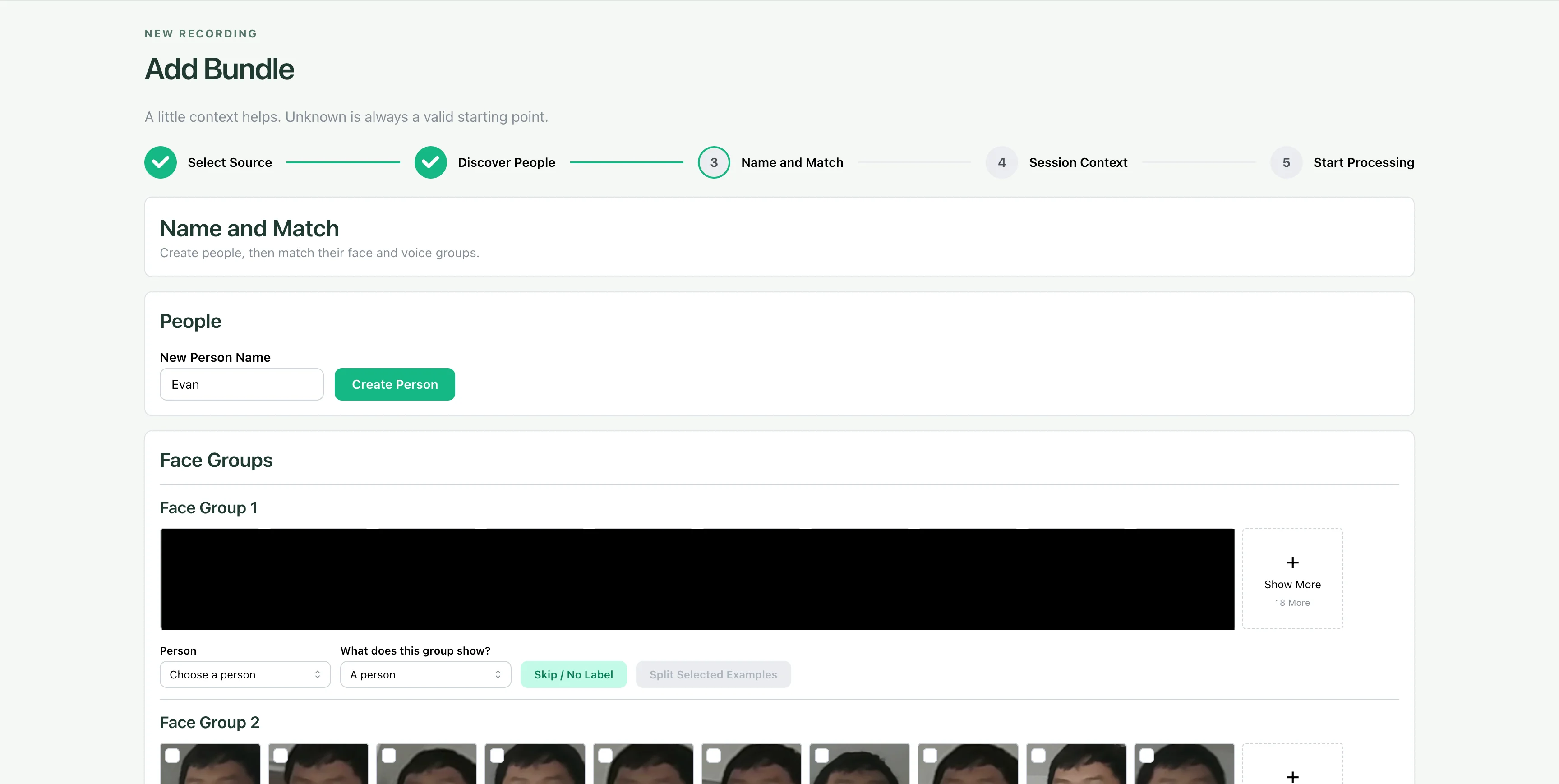
Sima now takes recorded bundles through intake, speech and visual processing, draft notes, and source-linked review.
In our testing, Sima automatically matches the correct speaker to the talking face in over 83% of cases, while also identifying the intended recipient. That gives each turn a useful social context: who is speaking, who we’re seeing, and who they’re talking to. In a room with several people and a robot, those connections make the conversation much easier to follow and evaluate.
Here are two snapshots from development:
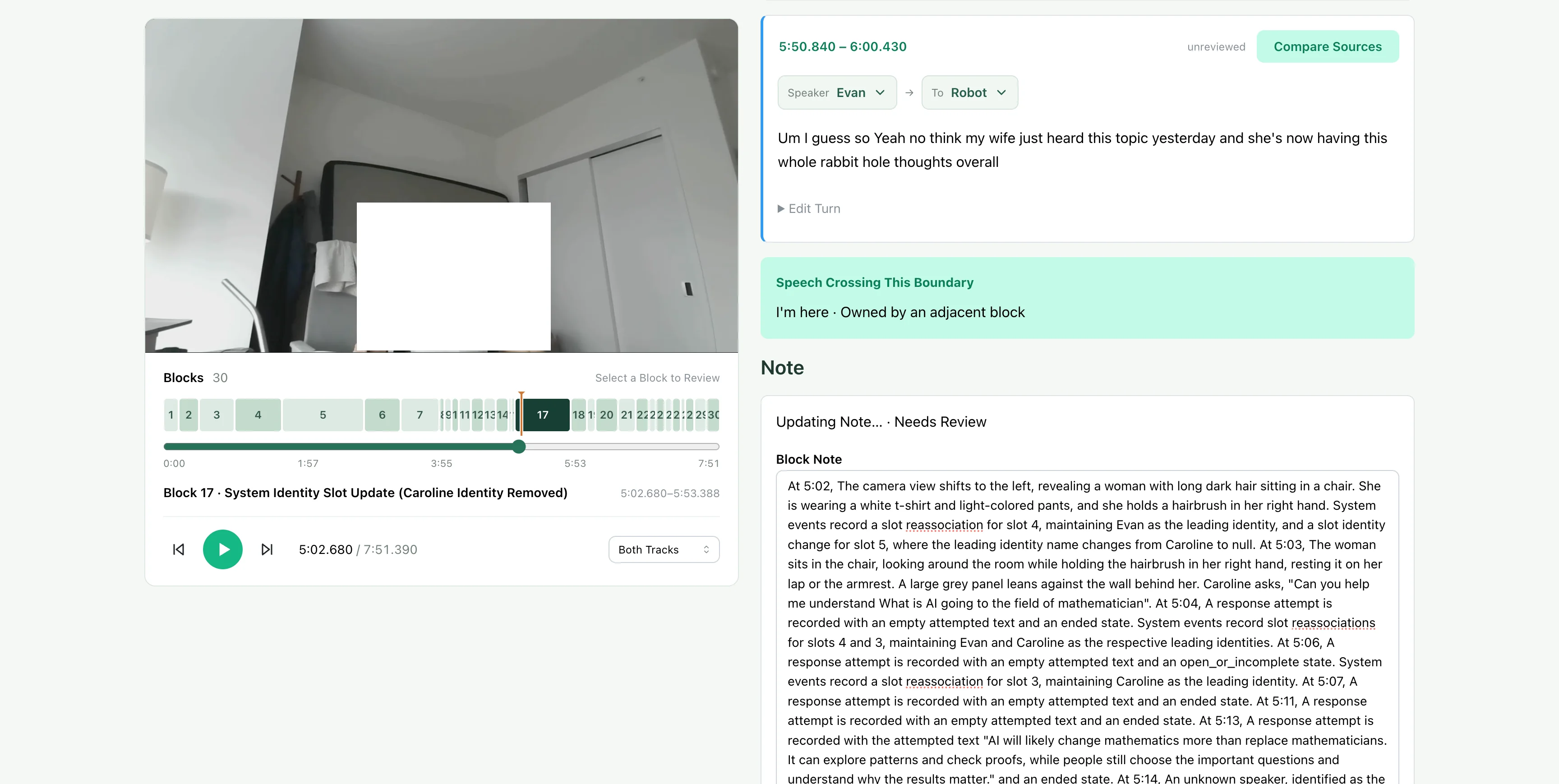
The experiment loop is straightforward: keep the recording fixed, save each run, find a specific miss, change the relevant stage, and compare again. If a crossing disappears from the notes, did sampling miss it, did the visual model miss it, or did the note writer drop it? Each answer suggests a different next experiment.
One useful comparison replaced full-resolution stills sampled at 0.5 FPS with 30-second native-video clips, processed at the model’s default 2 FPS with resized frames. On the same 7:51 recording, visual inference fell from 6:47 to 3:29. Total core-pipeline time fell from 21:53 to 20:39.
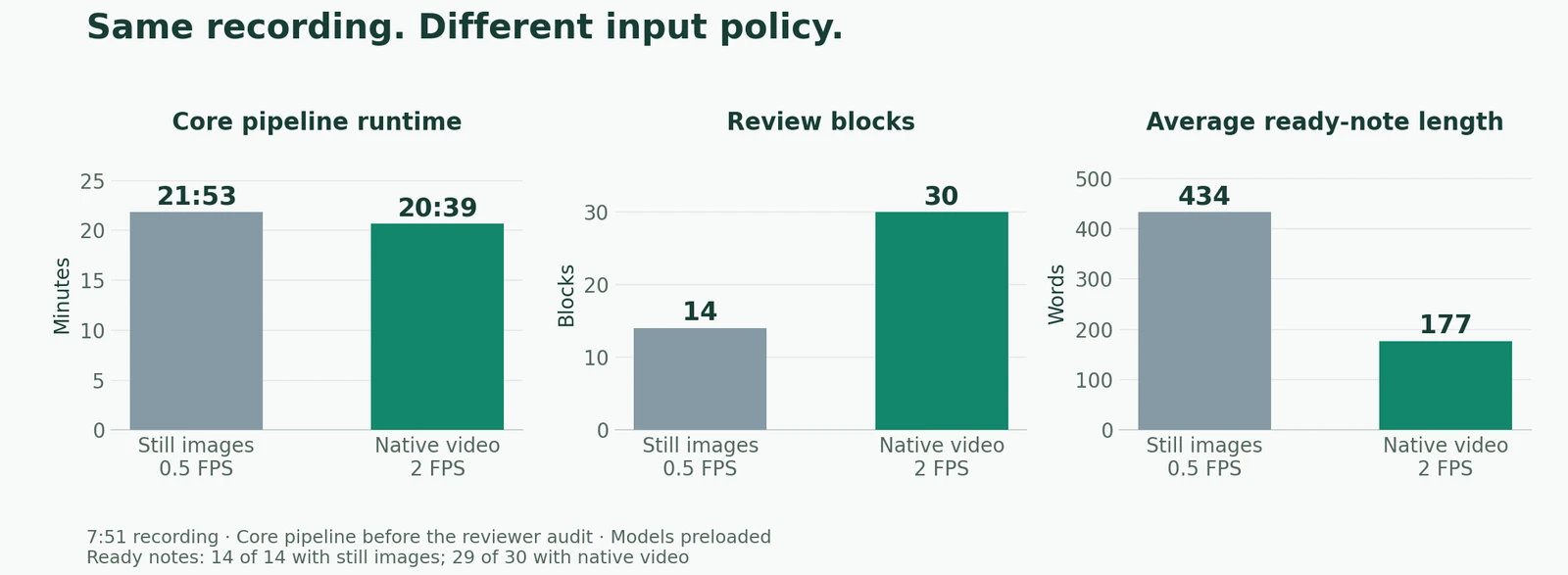
The output also changed: 14 blocks became 30, while average ready-note length went from 434 to 177 words. That gives us smaller, more focused pieces to inspect. The video run produced 29 ready notes, with one more flagged for inspection.
My target is two to three times the recording length: ideally, a ten-minute bundle finishes within thirty minutes. The core run above reached 2.63×. We tune frame rate, resolution, overlapping context, and reviewer work around that target. Meanwhile, the machine drafts the analysis and I get to work on something else before returning for review.
The Cost of Cloud Inference
Let’s put a price on those repeated passes using Gemini 3.8 Flash, which does have strong video understanding and native audio/video input (vs. still frames). For a ten-minute bundle with eight equivalent passes, assume static video processing at 1 FPS, with 258 tokens per frame at non-low media resolution and 32 audio tokens per second. That adds up to about 1.24 million video tokens and 154,000 audio tokens.
At Gemini 3.8 Flash’s post-intro standard rates, effective January 1, 2027 - $1.50 per million input tokens and $7.50 per million output tokens, including thinking - the inputs cost about $2.09. Add 30,000 output/thinking tokens across the workflow, and the total reaches roughly $2.31 per ten-minute bundle, or $4.63 for twenty minutes with proportionally more output.
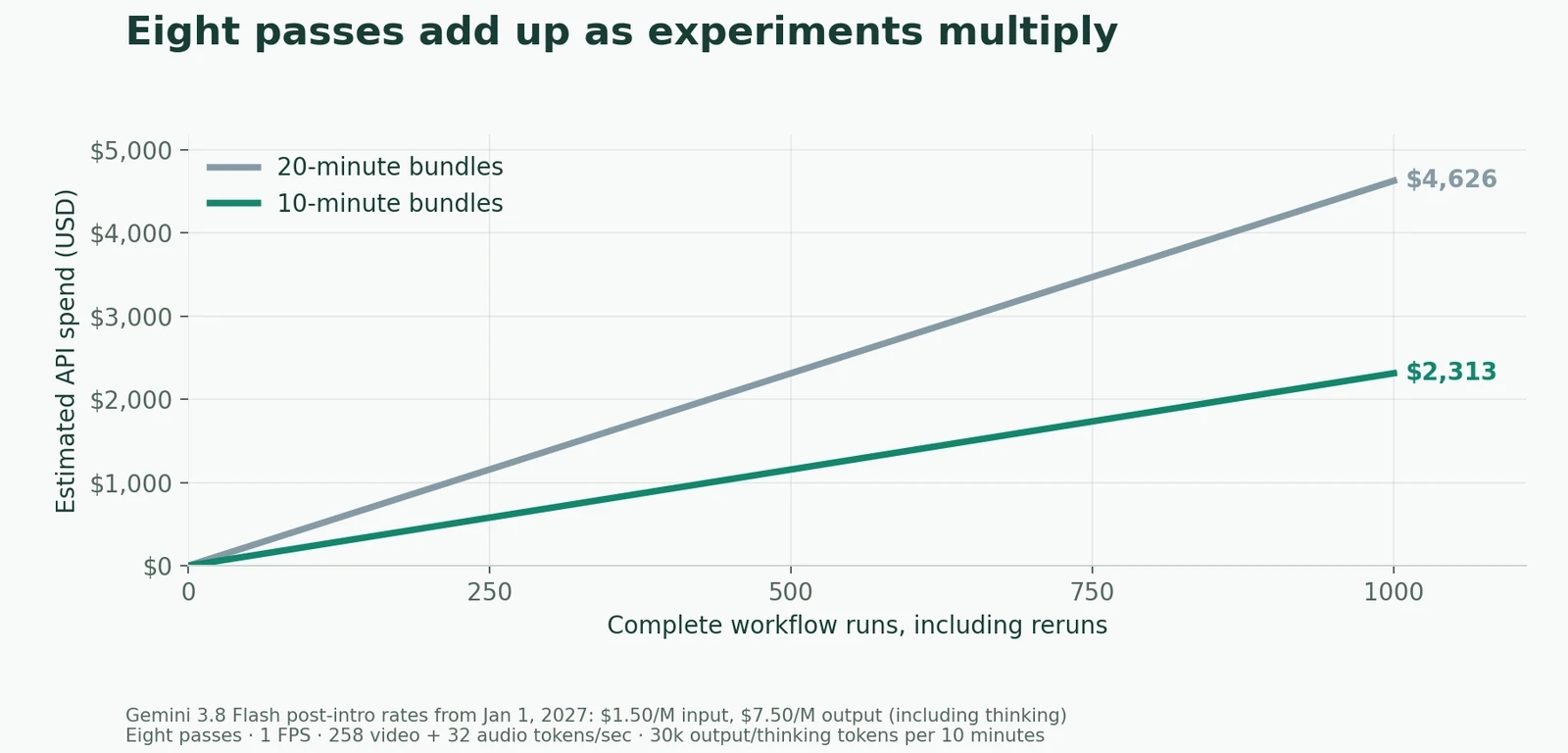
A couple of dollars is easy to overlook. For each bundle, we will also rerun a new iteration of the stack against the bundle, which then generates a new set of behaviors in a new bundle. Multiply it by a growing collection of recordings, several passes, and every promising “what if,” and experimentation becomes a recurring bill. On DGX Spark, that same curiosity keeps using the hardware already on the desk.
For us, the appeal is the combination: repeated local runs, control over sensitive recordings, and enough memory to keep several capable models close at hand. DGX Spark makes this particular experiment comfortable to pursue.
Real2Sim2Real
This is where the recordings get a second life, beyond the first annotated review.
One of our home-grown simulators is a 3D engine populated by scripted NPCs, with the robot participating in the scene. We let the interaction play out and observe what happens. Checking whether a reply makes sense is relatively straightforward from the transcript. Checking whether the robot feels natural in the room is a much more interesting problem.
Did it turn toward the person who started speaking? Did it keep listening when they glanced away? Did it jump into a pause that wasn’t actually an invitation to talk? A perfectly reasonable sentence can still arrive at a wonderfully awkward moment.
The people in the simulator need that same richness. It’s easy to give an NPC a line and a destination, then accidentally create a room full of very articulate mannequins. Our stack has plenty of controls for behavior; hand-authoring the little changes every few seconds is the tedious part. Real recordings already contain that choreography: glances, hesitations, overlapping speech, someone crossing behind the speaker, simultaneous mouth movements (real speech or chewing motion). Sima gives us a way to start turning it into something reusable.
On the other hand, how about sensor (in)fidelity? Simulation is inherently a perfect environment to begin with: clean video feed, crisp audio and speech, controlled lighting, perfect DoA readings, etc. Yes, we can apply well-known techniques to distort, but we want the realistic distortion patterns on the exact rigs that we are simulating, and the labeled data allow us to extract and apply just that.
The next step is to close the loop:
- Turn Reviewed Recordings into Scenarios. Translate Sima’s annotations into timed NPC behavior: who speaks, where they move, when they look toward the robot, and how those actions overlap. Keep each scenario connected to the original recording and the behavior we want to improve.
- Build a Simulation Corpus. Start with faithful replays, then create controlled variations. Have the interruption happen a little earlier, move a speaker farther away, or send another person across the robot’s view. One useful real-world moment can become a whole family of repeatable tests.
- Let the Coding Agent Iterate. Give the agent a scenario, the expected behavior, and the observed failure. It can work on the perception, belief, or response logic, run the scene again, and check the change across the growing corpus.
- Send Simulation Recordings Through Sima. Record the simulated interaction and run the same labeling and evaluation pipeline over it. Compare the scene, the robot’s beliefs, and its reactions, then feed the findings into the next coding iteration.
- Take It Back into the Room. Run the improved stack with real people again. Those sessions bring fresh surprises, which become the next recordings, annotations, and simulation scenarios.
Imagine a real test where the robot loses track of the speaker as another person walks past. We want to capture that moment once, replay it on demand, vary the crossing, and give the coding agent a concrete problem to work through. Then we take the fix back to real people and see how it feels.
That’s the Real2Sim2Real dream: every real session enriches the simulator, every simulation gives the agent another chance to improve, and every return to the real world teaches us what to tackle next.